Headless CMS Explained: Should Your Business Switch in 2026?
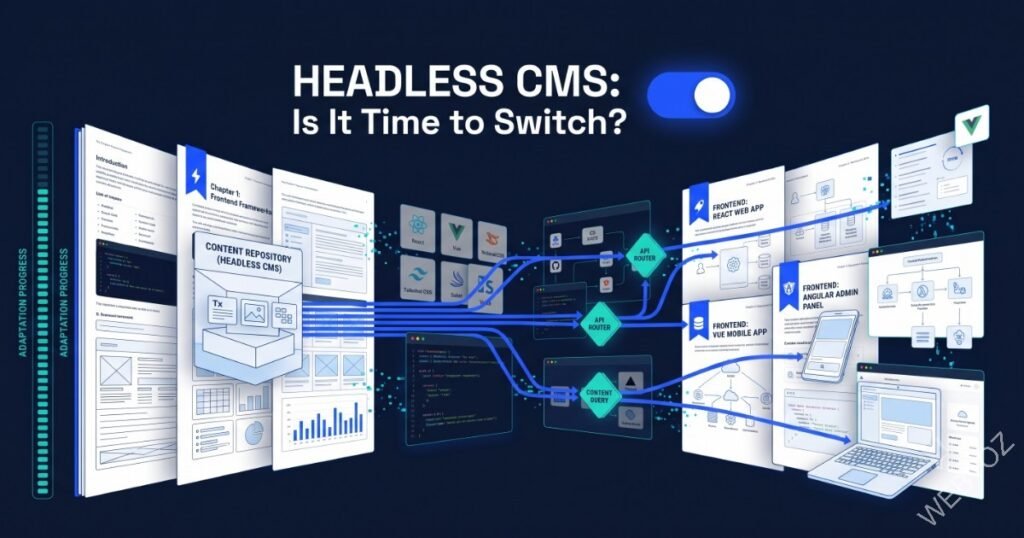
Traditional CMS platforms bundle content management and page rendering into one system — edit the content, and the same system draws the page. A headless CMS breaks that bundle apart: content lives in the CMS, and a separately built front end fetches it through an API, wherever and however you need to display it.
This guide explains what headless architecture actually means, when it is worth the added complexity, and how it fits into a broader custom web development strategy.
You will learn how headless CMS architecture works, its real advantages and trade-offs, and a framework for deciding if 2026 is the year to make the switch.
📖 In This Guide
1. What Headless CMS Actually Means
In a traditional CMS, content and presentation are tightly coupled — the templates live inside the same system as the content editor. In a headless setup, the CMS only manages and stores content, exposing it through an API; a separately engineered front end decides how and where that content appears. This means the same content can power a website, a mobile app, and a kiosk display from one source.
Content as Data
Structured content stored independently of any specific presentation layer.
API-Driven
Content is fetched wherever it is needed, across any channel.
Free Front End
Developers choose any framework, unconstrained by the CMS’s own templating system.
2. The Real Advantages of Going Headless
The two most concrete advantages are performance and flexibility. A decoupled front end can be built for speed without being constrained by CMS templating overhead, and the same content can be reused across multiple channels without duplication. This pairs naturally with static or hybrid rendering approaches.
3. The Trade-offs You Should Know About
4. When It Makes Sense to Switch
- You publish to multiple channels: Web, mobile app, and digital signage sharing the same content.
- Performance is a top priority: Traditional CMS templating is capping your Core Web Vitals scores.
- You want long-term flexibility: The ability to change the front-end framework without migrating content.
5. Common Questions
5. Common Questions
Does going headless mean giving up an easy content-editing experience?
Not necessarily — most modern headless platforms offer editing interfaces on par with traditional CMS platforms. The main additional cost is building preview functionality so editors can see their changes before publishing.
Is headless CMS overkill for a simple business website?
Often, yes. If you only publish to a single website with modest traffic, a traditional CMS may deliver the same practical outcome with far less setup overhead.
How to Migrate to a Headless CMS
1. Model Your Content
Define content types and structure independent of any specific page layout.
2. Choose a Headless Platform
Select a CMS that matches your editorial and API needs.
3. Build the Front End
Engineer a presentation layer optimised for performance.
4. Migrate Existing Content
Move content into the new structure, preserving SEO through careful redirects.
5. Add Preview Tooling
Give editors a way to preview changes before publishing live.
6. Train Your Content Team
Ensure editors are comfortable in the new workflow before full cutover.
6. Final Thoughts: Freedom Comes With Responsibility
A headless CMS is a genuine architectural upgrade for the right business — but the flexibility it offers comes with real engineering responsibility that a traditional CMS otherwise handles for you. Weigh the trade-off honestly against your actual channel and performance needs.
Considering a headless migration? Contact us for an architecture review, or read more about our technology consultancy services.
About Webtoz Solutions Team
Webtoz is a full-service web development, software development, and technology consultancy. Learn more about our team, explore our services, or get in touch.
Wondering If Headless CMS Is Right for You?
Let us review your content and channel needs and recommend the right architecture.
Get in Touch →