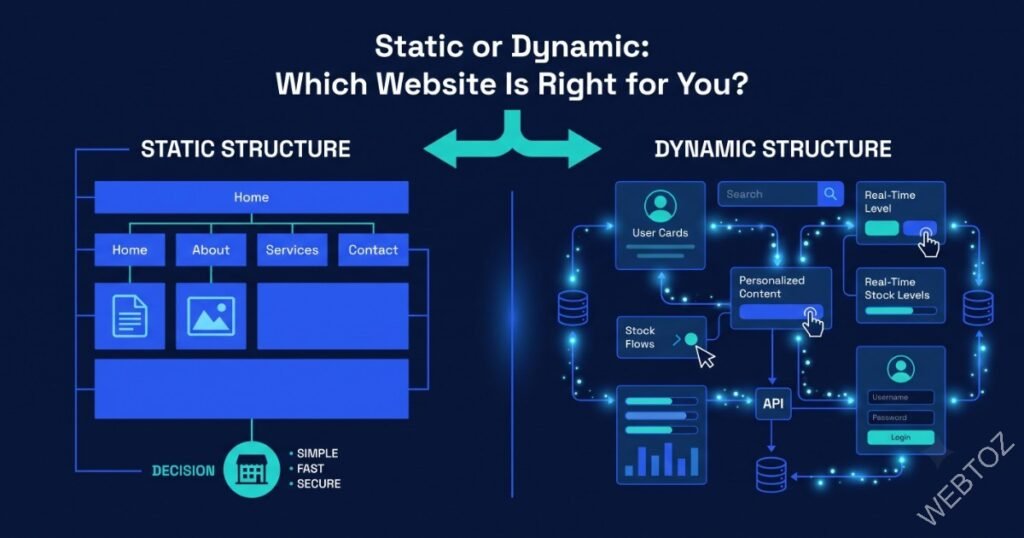
Static vs Dynamic Websites: Which One Does Your Business Actually Need?
“Static or dynamic?” sounds like a purely technical question, but it has real business consequences: it affects your hosting cost, your page speed, how easily content can change, and how the site can grow with you. Getting this decision right early avoids a costly re-architecture later.
This guide explains the real difference between static and dynamic websites in plain terms, and gives you a framework for choosing the right one as part of your custom web development project.
You will learn how static and dynamic sites actually differ under the hood, the pros and cons of each, and how to decide which fits your business today.
📖 In This Guide
1. The Core Technical Difference
A static website serves pre-built HTML files directly to the visitor’s browser — nothing is generated on the fly, so pages load extremely fast and there is very little that can break. A dynamic website generates pages in real time, often pulling from a database, so content can change per visitor, per login, or per request.
Static
Pre-built pages served directly — fast, simple, and highly secure by design.
Dynamic
Pages generated per request from a database — flexible, but more moving parts.
Hybrid
Static where possible, dynamic where necessary — often the best of both worlds.
2. Pros and Cons of Each Approach
3. The Middle Ground: Jamstack and Hybrid Rendering
Modern frameworks increasingly blur this line. Jamstack architecture pre-builds most pages as static files while calling APIs for the dynamic pieces, giving you the speed of static with the flexibility of dynamic where it matters. This pairs especially well with a headless CMS approach.
5. Common Questions
5. Common Questions
Can a static site still have a contact form or blog?
Yes, through third-party services and build-time content generation. Forms can submit to an external handler, and blog content can be generated at build time from a headless CMS, keeping pages static while content remains easy to update.
Is a dynamic site always slower than a static one?
Not necessarily, with proper caching and optimisation. A well-engineered dynamic site with server-side caching can rival static performance, though it requires more ongoing attention to maintain.
4. Which Fits Your Business?
- Choose static if: your content changes infrequently and there is no login or personalisation.
- Choose dynamic if: users need accounts, dashboards, or content that changes per visitor.
- Choose hybrid if: you want a mostly-static marketing site with a few dynamic features layered in.
How to Choose, Step by Step
1. List Required Personalisation
Determine if any content needs to differ per user.
2. Estimate Content Update Frequency
Frequent updates favour a CMS-backed approach.
3. Weigh Performance Priorities
Static wins if raw speed is the top priority.
4. Consider Future Features
Plan for logins or dashboards you might add later.
5. Consult a Developer
Get an architecture recommendation based on your specific requirements.
6. Build with Room to Evolve
Choose an architecture that can add dynamic features later without a full rebuild.
6. Final Thoughts: Match the Tool to the Job
Neither static nor dynamic is inherently better — the right architecture is the one that matches your content needs and growth plans, not the one that sounds more impressive.
Not sure which architecture fits your project? Contact us for an honest recommendation, or explore our technology consultancy services.
About Webtoz Solutions Team
Webtoz is a full-service web development, software development, and technology consultancy. Learn more about our team, explore our services, or get in touch.
Not Sure If You Need Static or Dynamic?
Let us review your requirements and recommend the right architecture for your business.
Get in Touch →