WordPress vs Custom Web Development: Which Is Right for Your Business?
WordPress is often the default answer when a business needs a website — it’s mature, well-documented, and has a plugin for almost anything. But “a plugin for almost anything” is precisely where the trade‑off begins: stitching together plugins to approximate custom functionality is not the same as building that functionality correctly from the ground up.
This guide gives an honest, non-biased comparison between WordPress and custom web development, so you can choose based on your actual business needs rather than default habit. For a broader overview of what custom development includes, see our complete guide to custom web development services.
You’ll learn where WordPress genuinely excels, where it starts to strain, and a practical framework for deciding which path fits your business today — and in three years.
📖 In This Guide
1. Where WordPress Genuinely Excels
WordPress earned its dominance honestly. For content-heavy sites, blogs, and straightforward brochure or small business websites, it remains one of the fastest, most cost-effective ways to get online. A non-technical team can update content independently, thousands of themes and plugins exist for common needs, and the hosting ecosystem is mature and affordable.
Non‑Technical Content Editing
Marketing teams can publish and update content without a developer.
Lower Upfront Cost
Faster to launch for straightforward brochure and blog sites.
Mature Plugin Ecosystem
Common needs like SEO tools and basic forms are well covered out of the box.
2. Where WordPress Starts to Strain
The strain typically appears in three places: performance at scale, complex or unusual business logic, and security surface area created by accumulating plugins. A site that started simple and grew a dozen plugins over several years often becomes slower, harder to maintain, and more vulnerable than a purpose-built alternative.
6. Common Questions
6. Common Questions
Is WordPress inherently less secure than a custom build?
Not inherently — but its popularity makes it a bigger target, and every added plugin is a new potential vulnerability. A well-maintained WordPress site with minimal plugins can be very secure; a plugin-heavy, rarely-updated one is a common attack vector.
Can WordPress handle high-traffic or complex e-commerce sites?
With significant investment in caching, hosting, and custom development, yes — but at that point, the cost advantage over a custom build often disappears. Many large-scale WordPress sites are heavily customised to the point of resembling custom development anyway.
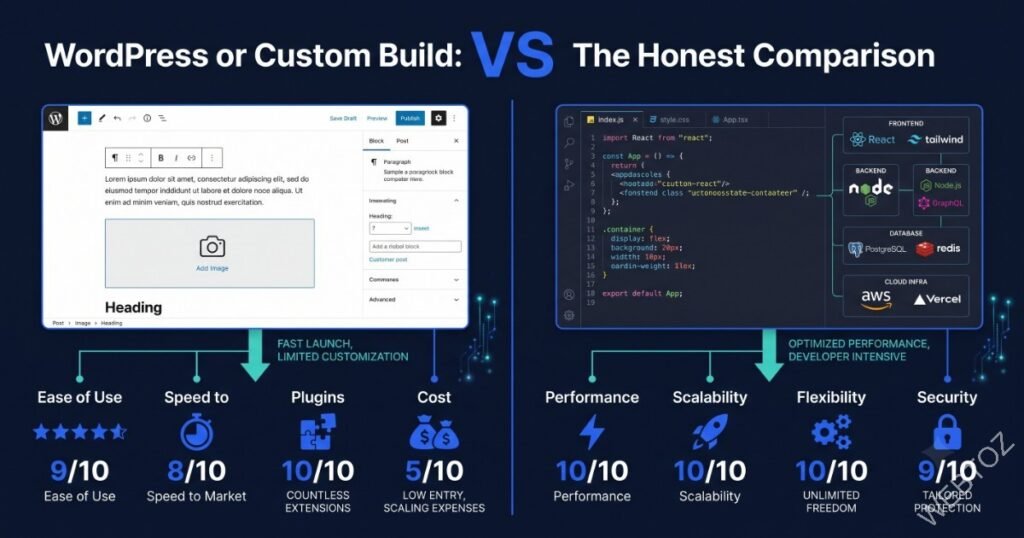
3. Head-to-Head Comparison
4. The Hybrid Approach: Headless WordPress
A growing middle path is using WordPress purely as a content backend, paired with a custom-built front end — sometimes called headless WordPress. This gives content teams the familiar WordPress editing experience while giving developers full control over performance and user experience. For more on this pattern generally, see our guide on headless CMS.
5. A Simple Decision Framework
- Choose WordPress if: content updates are frequent, the feature set is standard, and budget is the primary constraint.
- Choose custom development if: you need deep integrations, unique business logic, or performance at real scale.
- Consider hybrid/headless if: you want non‑technical content editing without sacrificing front‑end performance.
How to Make the Decision, Step by Step
Work through this checklist before committing to a platform.
1. List Required Integrations
Identify every system your site must connect to.
2. Estimate Future Traffic
Plan for where you’ll be in two to three years, not just launch day.
3. Assess Content Team Skills
Decide how much non‑technical editing capability you truly need.
4. Get Quotes for Both Paths
Compare total cost of ownership, not just launch price.
5. Consult a Technology Advisor
An independent architecture review can validate your decision before you commit budget.
6. Commit and Plan for Growth
Whichever path you choose, plan the architecture with your next stage of growth in mind.
7. Final Thoughts: Both Are Right, at Different Times
Neither WordPress nor custom development is objectively superior — the right choice depends entirely on your content needs, technical complexity, and growth trajectory. A good technology partner will recommend honestly, even if that means suggesting the less expensive option.
Not sure which path fits your business? Our technology consultancy team can give you an honest architecture recommendation — contact us to get started.
About Webtoz Solutions Team
Webtoz is a full‑service web development, software development, and technology consultancy. Learn more about our team, explore our services, or get in touch.
Not Sure Which Platform Is Right for You?
Let’s talk through your requirements and get you an honest, unbiased recommendation.
Get in Touch →